
A Utah MLS data sheet is more than a price and a photo gallery. Understanding the Utah MLS data sheet means reading the full listing record: property details, listing and sale dates, list and sale prices, concessions, and broker-only or private information. The MLS is a private database generally restricted to licensed real estate agents and brokers, so a public listing may not show every field.
It’s easy to focus on photos or the headline price when you’re searching for a home. The useful details help you compare properties with your needs, while location filters can narrow the search to areas that fit your priorities. This guide explains how to read key fields, use listing information and location filters, and spot details that deserve a closer look, so you can search with greater clarity and confidence.
Key Takeaways
- Learn which parts of a Utah listing record help you assess a home, and which details may be intended for brokers.
- Distinguish listing statuses so you can decide which homes to prioritize and which may still be worth watching.
- Compare a property’s size and age fields more carefully before deciding whether it fits your needs.
- Use bedroom, bathroom, basement, and neighborhood details to narrow your search to better-fitting homes.
What fields are included on a Utah MLS property data sheet?
- Separate property facts from broker information. Start with the property description, which summarizes the home and its listed features. Utah MLS listings can also include access or private information shared between brokers. Treat those fields as distinct from the public-facing description. For example, a showing-access note serves a different purpose than a description of the home’s layout. Reading both parts helps you understand what the listing presents to buyers and what supports broker communication.
- Scan the feature selections for useful specifics. The Wasatch Front Regional MLS input form recommends a maximum of 4 garage or parking features and 10 interior special features. It allows up to 10 inclusions or exclusions to be selected. Use those fields to spot practical details, such as which items are included in the sale. A short selection list doesn’t describe every aspect of a home, so compare the marked features with the written property description.
- Read accessibility fields literally. The Wasatch Front Regional MLS form lists 36-inch-wide hallways as an accessibility feature. It also recommends a maximum of 8 accessibility features. Treat these selections as specific listing details, not as a complete assessment of whether a home suits someone’s mobility needs. For instance, a hallway width is one useful dimension, while the rest of the home’s layout may also shape its practicality.
- Use transaction fields to understand the listing timeline. Utah MLS transaction records commonly include the list price, sales price, concessions, and sale and listing dates. Compare those fields together rather than treating the asking price as the full transaction picture. A concession, for example, appears separately from the sales price. This distinction helps you interpret a home’s recorded sale details without confusing them with its original listing terms. These fields make understanding the Utah MLS data sheet more practical.
Comparing Utah MLS Statuses: Active, Pending, Backup
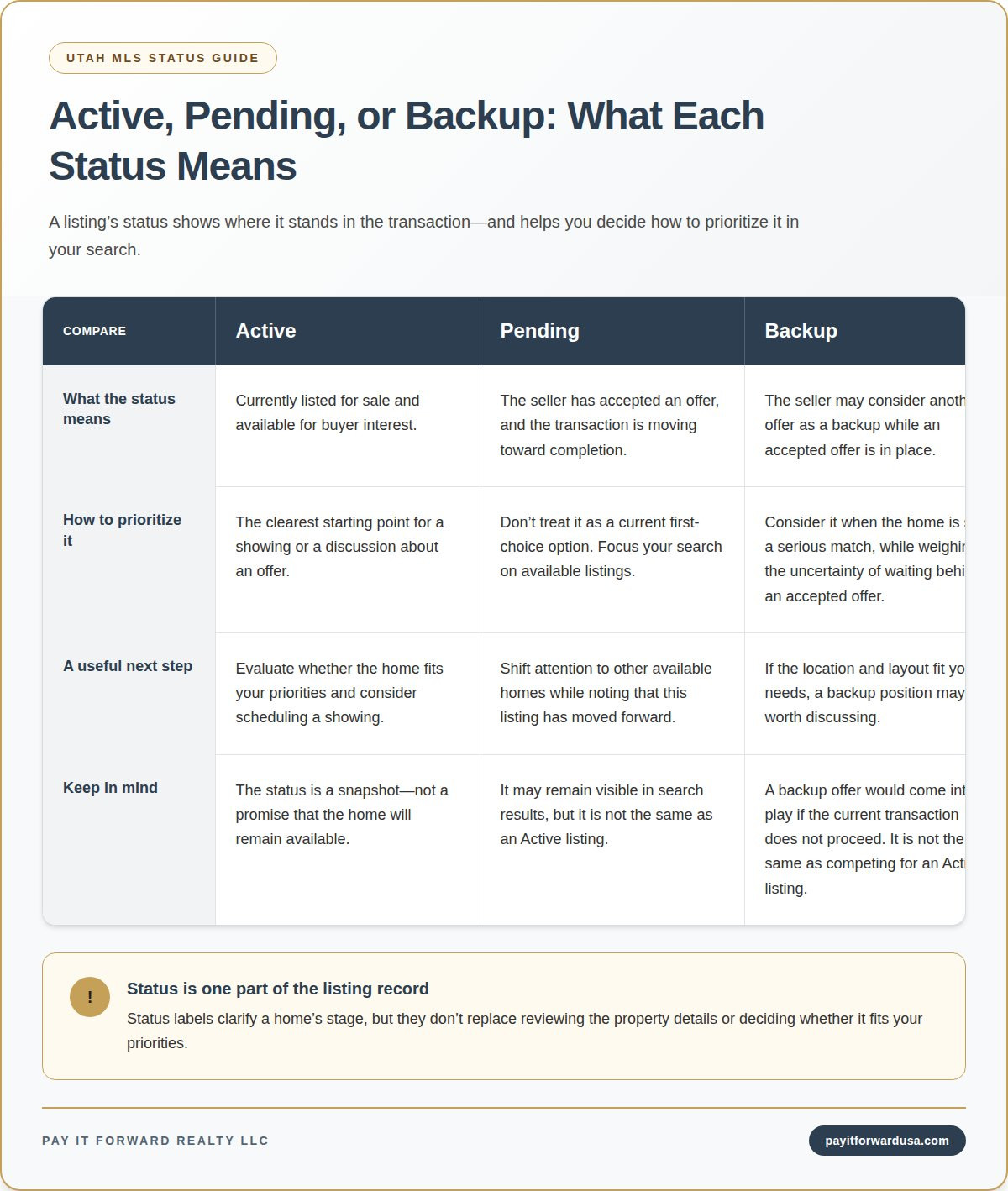
- Prioritize Active listings. An Active status means the home is currently listed for sale and available for buyer interest. It’s the clearest starting point for scheduling a showing or discussing an offer. Still, treat the status as a snapshot, not a promise that the home will remain available. If a listing catches your eye, note its address and status, then compare its features with your priorities before taking the next step.
- Read Pending as an accepted-offer stage. Pending means the seller has accepted an offer and the transaction is moving toward completion. That makes the property different from an Active listing, even if it remains visible in search results. Don’t treat it as a current first-choice option. Instead, use it to understand which homes have moved forward and to keep your search focused on available listings.
- Consider Backup when the home is still a serious match. A Backup status indicates the seller may consider another offer as a backup while an accepted offer is in place. That offer would come into play if the current transaction doesn’t proceed. For example, if a home’s location and layout fit your needs, a backup position may be worth discussing. It isn’t the same as competing for an Active listing.
- Use the status to choose your next action. For an Active home, prioritize a showing and evaluate whether it fits. For a Pending home, shift attention to available alternatives. For a Backup listing, weigh your interest against the uncertainty of waiting behind an accepted offer. Status labels clarify the listing’s stage, but they don’t replace reviewing the property details. Keep the categories straight as you refine your Utah home search.
How should I read the price, square footage, lot size, and year-built fields on a Utah MLS sheet?
- Read price fields as separate figures. Start with the list price, then distinguish it from the sales price and any concessions. A list price reflects the asking amount, while a recorded sales price describes the transaction. Utah sales prices aren’t held as public records, though sellers working through licensed agents share pertinent transaction data with the MLS. Don’t treat a listing’s asking price as proof of its final sale amount.
- Use square footage to compare similar homes. Check the square-footage field alongside the property description, not by itself. Compare homes with similar layouts and features, then note whether the listed area seems relevant to how you’d use the space. For example, a home with a large open living area may suit you differently from one with the same stated area divided among smaller rooms.
- Interpret lot size through your priorities. A lot-size figure describes land area, but it doesn’t explain the property’s shape or how the outdoor space is arranged. Pair it with listing photos and the written description. A larger lot may matter if outdoor space is a priority; a compact lot may fit better if you prefer less yard to manage. Use the field to narrow options, not rank homes automatically.
- Treat year built as context, not a condition rating. Use the year-built field to understand a home’s age, then read the description for details about updates and features. Two homes built in the same year can differ in layout, finishes, and upkeep. For example, an older home with described updates may suit your priorities better than a newer home with a layout you don’t want. Compare all four fields together to avoid letting one figure decide.
Keep disclosure limits in mind when checking a sales-price field: Utah homeowners who opt out of disclosing their sales price on the MLS with an agent may pay a $500 fee. In Utah, parties to a property transaction without an agent can choose to keep the sales price anonymous. An MLS sheet may therefore not show every transaction’s sales price, so avoid treating an absent figure as evidence of what the home sold for.
How are bedrooms, bathrooms, basement areas, and finished square footage reported in Utah MLS listings
- Use bedroom count as a starting point. The bedroom field gives you a quick way to screen homes, but it doesn’t show room dimensions or arrangement. Compare the count with the property description and photos. For example, a listing with three bedrooms may have a layout that places one room away from the others. Consider whether the arrangement works for your household, not just whether the number matches your filter.
- Read the bathroom count alongside the details. A total bathroom figure helps compare listings, while the description may clarify how those bathrooms are configured. Look for distinctions between full and partial bathrooms when the listing provides them. For example, two homes with the same total could differ in the number of full bathrooms. Use photos and the written details to judge whether the setup suits your routine.
- Separate basement area from finished space. A basement may include finished and unfinished areas, so don’t assume every basement square foot offers the same use. Read the basement fields with the description. A listing might describe finished rooms alongside storage or utility space. That distinction can affect how you picture the home’s usable living areas, especially if you want a guest room, workspace, or recreation area.
- Compare finished square footage consistently. Check what the listing says about finished areas, then compare similar homes using the same kind of space. Don’t add basement area to above-ground space yourself unless the listing clearly supports that comparison. For example, one home’s total may include finished basement space while another’s figure reflects different areas. If you’re preparing your own property details for an MLS listing, explore the monthly listing plan as a listing option.
Multiple listing services can vary in scope, from broad databases to highly local ones. A Utah real estate agent may set up a private client portal that lets a client view local MLS listings and receive notifications for listings matching their preferences.
Some local and regional MLS providers make listings publicly accessible to people who are not working with a local real estate agent. Utah sellers can use a flat-fee MLS listing service to market a property, but that service is for listing a home, not searching MLS properties.
Pay It Forward Realty
Pay It Forward Realty LLC offers Utah homeowners flat-fee MLS listing options for putting a property on the market. Understanding listing fields can help you organize property details and describe your home clearly. Selling a home and buying one are separate paths, so use the MLS details in this guide to clarify what matters for your next move, then explore the option that fits your situation.
Turn Your Search Into a Confident Next Move
Understanding the Utah MLS data sheet gives you a stronger starting point, but the next step is turning listing details into decisions that match your priorities. Before pursuing a home, consider which trade-offs matter most: location, layout, outdoor space, or how you plan to use each room. Keep those priorities in view as you assess options, so an appealing photo or impressive feature doesn’t distract you from the overall fit.
If you’re preparing to sell, clear property information can also help you present your home accurately to potential buyers. Pay It Forward Realty can help Utah homeowners list on the MLS, while buyers may explore the brokerage’s Buyer Rebate option when purchasing through it. Choose the direction that fits your move, and take the next step with a clear idea of what matters to you. Contact Pay It Forward Realty to discuss your real estate plans. You’re ready to move forward with more clarity and control.
Frequently Asked Questions
How to Utilize MLS Listing Information?
Use MLS information to narrow your search, compare likely matches, and plan which homes to explore. Start by filtering for Utah neighborhoods that suit your commute and daily routines. Then shortlist properties that meet your must-haves, and use listing details to identify what you want to see in person. Understanding the Utah MLS data sheet helps turn scattered listings into a focused search rather than a collection of attractive photos.


